
SolarMON: SolarEdge Live Data
Please read the details below!
====This is the Try-Version.
You can tryout SolarMON with your PV system for 7 days after installation without any limitation.
After that an information screen is shown every now and then.
If you like SolarMON you can buy the PRO version which has no limitations.
New features are only released in the PRO version.Features=======In contrast to the SolarEdge monitoring SolarMON connects directly via your local LAN to the Inverter and reads the real time data directly from it, totally cloud free!
This gives you a couple of advantages:1) No delay!
The data is Real-Time.
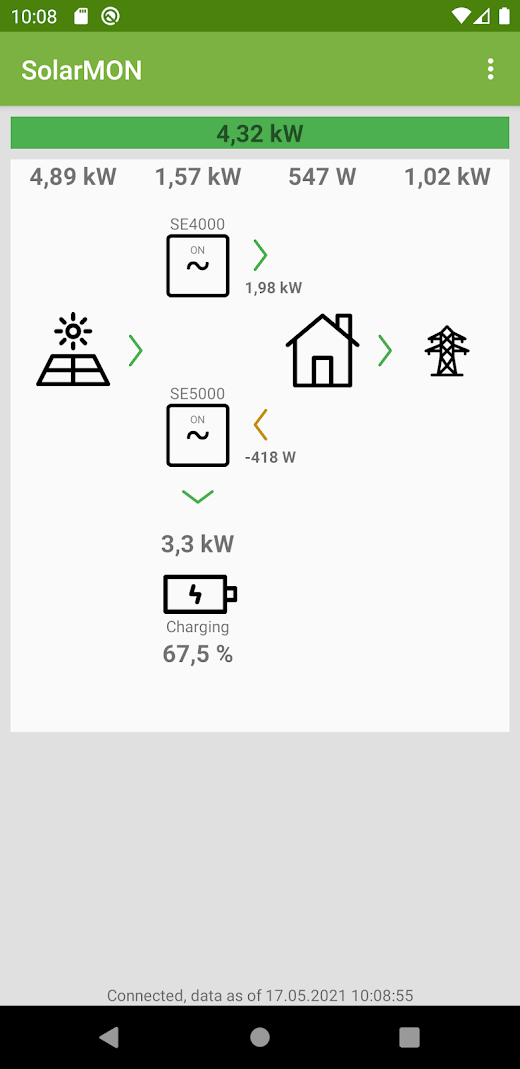
SolarMON supports updates down to every second, giving you exact inside what your Solar System is producing this very moment.2) It works even when your Internet is down or you do not have internet connection available at your installation side.3) No dependency on a cloud servers.
You do not share data with anybody and no cloud server that can be down letting you without a clue how much your Solar System is producing.
This is especially important for users who have inverters without a display.4) SolarMON shows you a lot of data that is not available in the SolarEdge monitoring, e.g.
simple PV excess production view, temperature of your inverter, state of health of your battery, per-inverter view etc.
Check out the screenshots.Setup=====SolarMON supports up to three inverters and one high-voltage battery connected directly to one of the SolarEdge inverters.SolarMON can be used if1) at least one of your inverters is connected to your local network (LAN) 2) and has MODBUS over TCP option enabled (unfortunately its disabled by default)3) and your inverter is SetApp configured or for LCD configured inverters has at least Firmware version 3.x or newerYour smartphone must be on the same local network in order to access your inverter, e.g.
on the WiFi of your local network.For more details on setting up SolarMON please see the detailed "Setup Instructions" in the App under the main menu or here http://www.abare.de/docs/SolarMON-SetupInstructions.pdf(*) SolarEdge, SOLAREDGE are trademarks or registered trademarks of SolarEdge Technologies, Inc.
About SolarMON: SolarEdge Live Data
- Package name (App ID)
- de.abare.solarmon.try
- Available on
- Google Play
- Price
- Free
- Developer
- Abare Software - Olaf Schadow
Looking for the SolarMON: SolarEdge Live Data APK?
The safest way to get SolarMON: SolarEdge Live Data (de.abare.solarmon.try) on your Android device is to install it directly from Google Play — you'll always get the latest official version, automatic updates, and no risk of modified or infected APK files from third-party sites.

Social Features
Connect and share with friends and the community.
Gaming Features
Enjoy immersive gaming experience with various game modes.
Weather Features
Get accurate weather forecasts and real-time updates.
See SolarMON: SolarEdge Live Data in Action


Frequently Asked Questions
Is SolarMON: SolarEdge Live Data free?
Yes, SolarMON: SolarEdge Live Data is free to download and install on Android through Google Play.
How do I install SolarMON: SolarEdge Live Data on Android?
Open Google Play on your Android phone or tablet, search for SolarMON: SolarEdge Live Data by Abare Software - Olaf Schadow or tap the Google Play button on this page, then tap Install. The app downloads and installs automatically.
What is de.abare.solarmon.try?
de.abare.solarmon.try is the App ID (package name) of SolarMON: SolarEdge Live Data on Google Play. Every Android app has a unique package name, and it is the safest way to verify you are installing the official app.
Is SolarMON: SolarEdge Live Data safe to download?
Installing SolarMON: SolarEdge Live Data from Google Play is the safest option: you get the official version published by Abare Software - Olaf Schadow, verified by Google Play Protect, with automatic updates. Avoid APK files from unofficial third-party sites.

Get SolarMON: SolarEdge Live Data Today
SolarMON: SolarEdge Live Data for Android — free download on Google Play.
Compatible with Android phones and tablets — available on Google Play.
Ask AI about this app
Get instant answers about features, tips and more from popular AI assistants.